How BackupMaster billing works on Shopify, including billing cycles, invoices, and free trials.
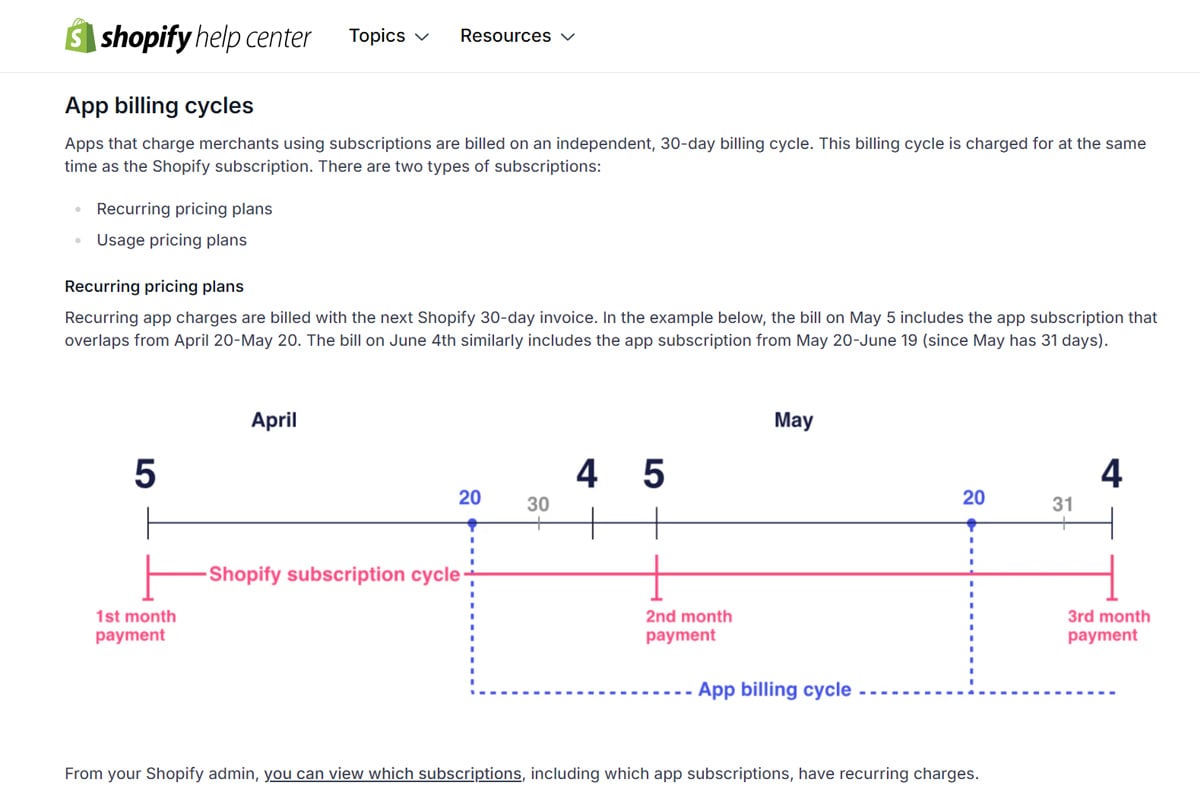
All BackupMaster billing runs through Shopify. You don’t need a separate payment method — charges appear as a line item on your regular Shopify invoice with your other app charges. For more on how Shopify handles app charges, see Shopify’s documentation on app subscriptions.
Your subscription runs on a 30-day cycle. The cycle starts when your 7-day free trial ends. Every 30 days after that, Shopify charges for the next cycle automatically.To view your charges, go to Settings > Billing in your Shopify admin and look for BackupMaster under App charges.
Every new installation starts with a 7-day free trial that includes full access to your selected plan’s features. Charges begin after the trial ends. If you uninstall BackupMaster before the trial ends, no charges apply.
You can upgrade or downgrade at any time. Shopify prorates charges automatically. For details on how upgrades and downgrades are billed, see Manage your subscription.
Uninstalling BackupMaster cancels all future charges immediately. The current billing cycle still applies — charges already incurred aren’t reversed. If you think a charge is incorrect, see Refunds.If you have questions, contact support at support@backupmaster.io.
Assistant
Responses are generated using AI and may contain mistakes.