> ## Documentation Index
> Fetch the complete documentation index at: https://docs.backupmaster.io/llms.txt
> Use this file to discover all available pages before exploring further.
# Cancel your Shopify subscription
> How to cancel your BackupMaster subscription by uninstalling the app from Shopify, and what happens to your data and billing.
To cancel BackupMaster, uninstall the app from your Shopify store. There is no separate cancellation step.
**Prerequisites**
* You must be the store owner or a staff member with permission to manage apps
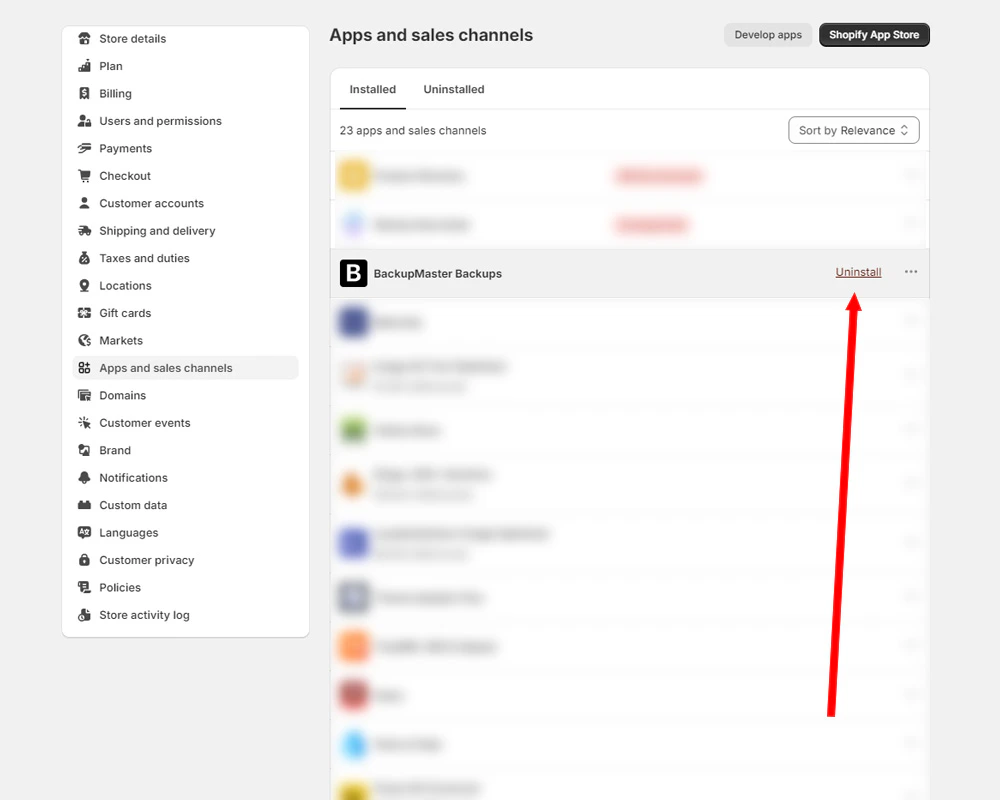
Go to **Settings** > **Apps and sales channels** in your Shopify admin.
Find BackupMaster in the list and click **Uninstall**.
 ## What happens after you uninstall
* **Billing:** Shopify cancels future charges immediately. Any pending charges already incurred still apply.
* **Backup data:** Your data is kept for a limited time, then permanently deleted. See [Data retention](/shopify/backups/how-backups-work#data-retention) for details.
* **Store code:** BackupMaster doesn't inject code into your store, so there's nothing to clean up.
## Need help?
If you have questions or need assistance, the support team is here to help. Reach out at [support@backupmaster.io](mailto:support@backupmaster.io).
## What happens after you uninstall
* **Billing:** Shopify cancels future charges immediately. Any pending charges already incurred still apply.
* **Backup data:** Your data is kept for a limited time, then permanently deleted. See [Data retention](/shopify/backups/how-backups-work#data-retention) for details.
* **Store code:** BackupMaster doesn't inject code into your store, so there's nothing to clean up.
## Need help?
If you have questions or need assistance, the support team is here to help. Reach out at [support@backupmaster.io](mailto:support@backupmaster.io).